![[ChimeraX Issue Tracking System]](/trac/ChimeraX/chrome/site/ChimeraX-icon.svg)
#19718 closed defect (fixed)
Incorrect initial scaling on spatial display
| Reported by: | Owned by: | Tom Goddard | |
|---|---|---|---|
| Priority: | normal | Milestone: | |
| Component: | VR | Version: | |
| Keywords: | Cc: | gregdp@… | |
| Blocked By: | Blocking: | ||
| Notify when closed: | Platform: | all | |
| Project: | ChimeraX |
Description
The following bug report has been submitted:
Platform:        Windows-10-10.0.26100
ChimeraX Version: 1.11 (2025-12-17 06:45:39 UTC)
Description
Incorrect initial scaling of scene with Sony ELF-SR2 screen.

The scene is displayed at low size/large distance at the bottom of the screen. The screen is operated in 45 degree tilted mode.

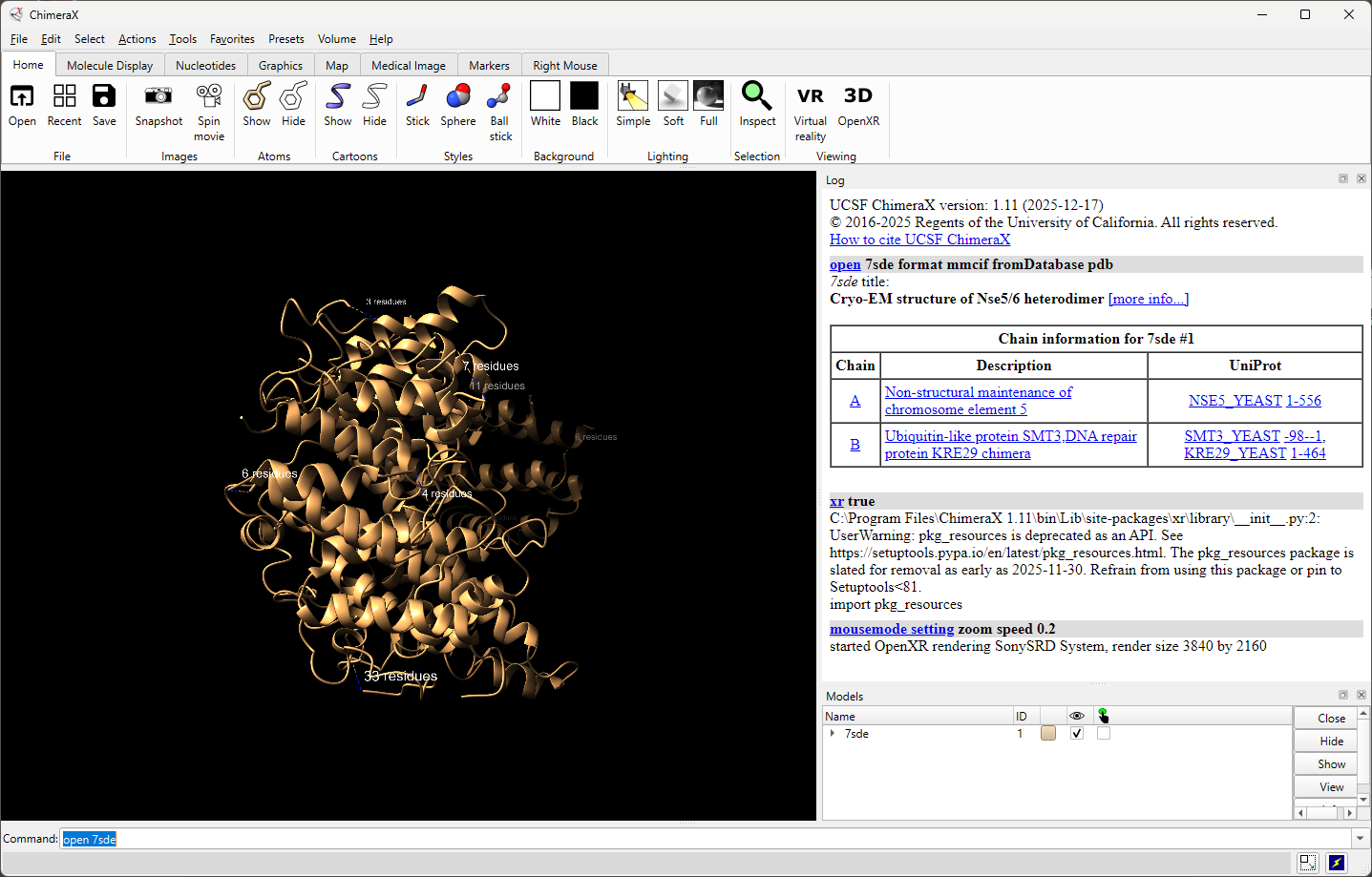
2 Images are attached in a zip-archive show the 2D viewport and 3D screen contents with unmodified ChimeraX 1.11.

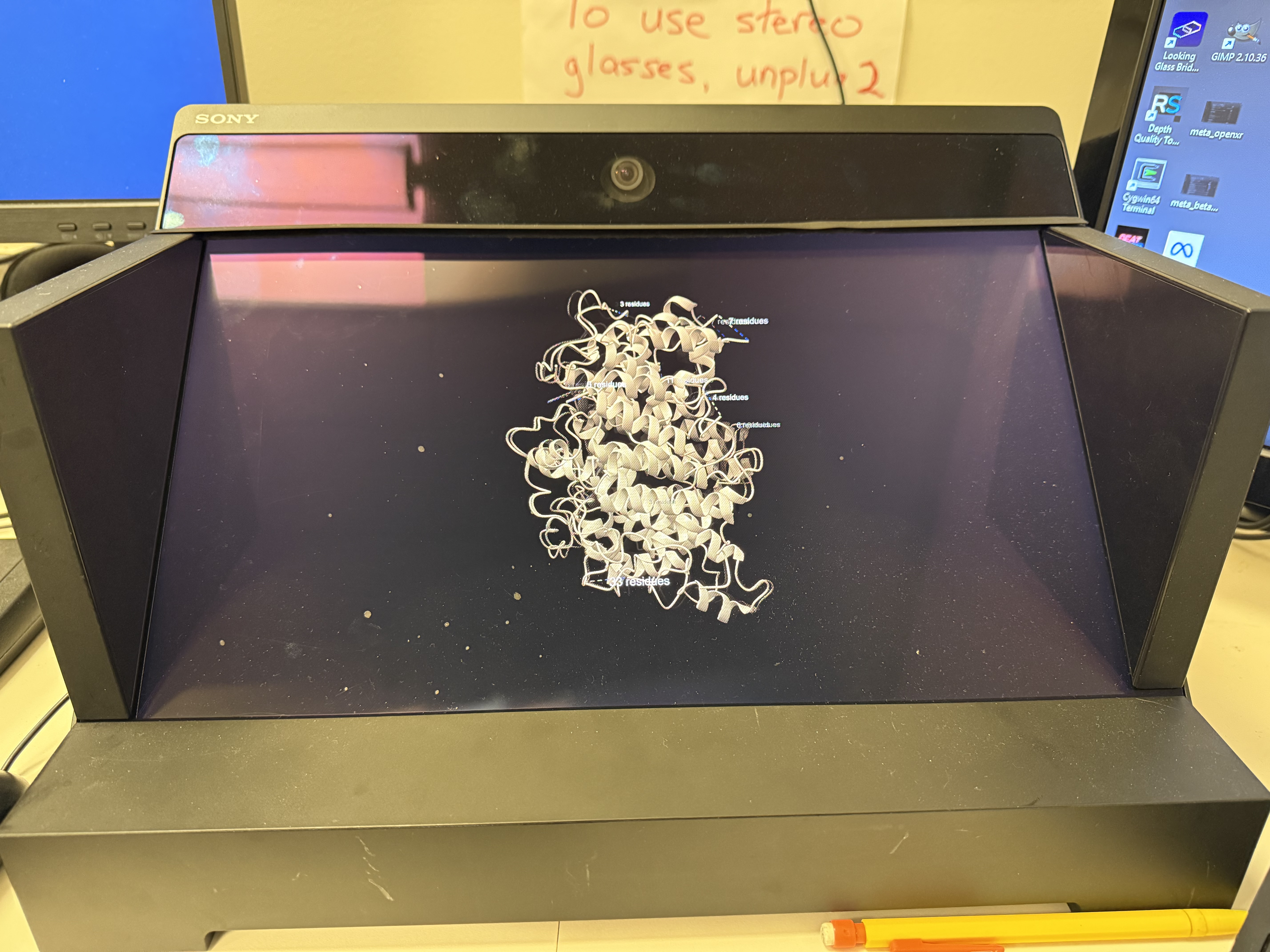
Operations:
- open PDB model
- xr on

Log:
UCSF ChimeraX version: 1.11 (2025-12-17)
© 2016-2025 Regents of the University of California. All rights reserved.
How to cite UCSF ChimeraX

> open 7sde format mmcif fromDatabase pdb

7sde title:
Cryo-EM structure of Nse5/6 heterodimer [more info...]

Chain information for 7sde #1
---
Chain | Description | UniProt
A | Non-structural maintenance of chromosome element 5 | NSE5_YEAST 1-556
B | Ubiquitin-like protein SMT3,DNA repair protein KRE29 chimera | SMT3_YEAST -98--1, KRE29_YEAST 1-464


> xr true

C:\Program Files\ChimeraX 1.11\bin\Lib\site-
packages\xr\library\\__init__.py:2: UserWarning: pkg_resources is deprecated
as an API. See https://setuptools.pypa.io/en/latest/pkg_resources.html. The
pkg_resources package is slated for removal as early as 2025-11-30. Refrain
from using this package or pin to Setuptools<81.
import pkg_resources

Could not find OpenXR screen ASV27-2P, 1ASV27-2P, DS1_156, SR Display , only
found , SR Display GB

> mousemode setting zoom speed 0.2

started OpenXR rendering SonySRD System, render size 3840 by 2160

> xr false

> mousemode setting zoom speed 1

> xr true

Could not find OpenXR screen ASV27-2P, 1ASV27-2P, DS1_156, SR Display , only
found , SR Display GB

> mousemode setting zoom speed 0.2

started OpenXR rendering SonySRD System, render size 3840 by 2160

> xr false

> mousemode setting zoom speed 1

> view

> view orient

> xr true

Could not find OpenXR screen ASV27-2P, 1ASV27-2P, DS1_156, SR Display , only
found , SR Display GB

> mousemode setting zoom speed 0.2

started OpenXR rendering SonySRD System, render size 3840 by 2160


OpenGL version: 3.3.0 NVIDIA 581.83
OpenGL renderer: NVIDIA GeForce RTX 5080 Laptop GPU/PCIe/SSE2
OpenGL vendor: NVIDIA Corporation

Python: 3.11.9
Locale: en_US.cp1252
Qt version: PyQt6 6.9.1, Qt 6.9.0
Qt runtime version: 6.9.2
Qt platform: windows

Manufacturer: Alienware
Model: Alienware 18 Area-51 AA18250
OS: Microsoft Windows 11 Pro (Build 26100)
Memory: 68,137,205,760
MaxProcessMemory: 137,438,953,344
CPU: 24 Intel(R) Core(TM) Ultra 9 275HX
OSLanguage: en-US

Installed Packages:
    aiobotocore: 2.26.0
    aiohappyeyeballs: 2.6.1
    aiohttp: 3.13.1
    aioitertools: 0.13.0
    aiosignal: 1.4.0
    alabaster: 1.0.0
    annotated-types: 0.7.0
    anyio: 4.12.0
    appdirs: 1.4.4
    asciitree: 0.3.3
    asttokens: 3.0.1
    asyncssh: 2.22.0
    attrs: 25.4.0
    autocommand: 2.2.2
    babel: 2.17.0
    backoff: 2.2.1
    backports.tarfile: 1.2.0
    beautifulsoup4: 4.13.5
    blockdiag: 3.0.0
    blosc2: 3.12.2
    boto3: 1.41.5
    botocore: 1.41.5
    build: 1.3.0
    certifi: 2025.11.12
    cffi: 2.0.0
    cftime: 1.6.5
    charset-normalizer: 3.4.4
    ChimeraX-AddCharge: 1.5.20
    ChimeraX-AddH: 2.2.8
    ChimeraX-AlignmentAlgorithms: 2.0.2
    ChimeraX-AlignmentHdrs: 3.6.1
    ChimeraX-AlignmentMatrices: 2.1
    ChimeraX-Alignments: 3.1.1
    ChimeraX-AlphaFold: 1.0.1
    ChimeraX-AltlocExplorer: 1.2
    ChimeraX-AmberInfo: 1.0
    ChimeraX-Animations: 1.0
    ChimeraX-Aniso: 1.3.2
    ChimeraX-Arrays: 1.1
    ChimeraX-ArtiaX: 0.6.0
    ChimeraX-Atomic: 1.61.4
    ChimeraX-AtomicLibrary: 14.2.1
    ChimeraX-AtomSearch: 2.0.1
    ChimeraX-AxesPlanes: 2.4
    ChimeraX-BasicActions: 1.1.3
    ChimeraX-BILD: 1.0
    ChimeraX-BlastProtein: 3.0.0
    ChimeraX-Boltz: 1.1
    ChimeraX-BondRot: 2.0.4
    ChimeraX-BugReporter: 1.0.2
    ChimeraX-BuildStructure: 2.13.1
    ChimeraX-Bumps: 1.0
    ChimeraX-BundleBuilder: 1.6.0
    ChimeraX-ButtonPanel: 1.0.1
    ChimeraX-CageBuilder: 1.0.1
    ChimeraX-CellPack: 1.0
    ChimeraX-Centroids: 1.4
    ChimeraX-ChangeChains: 1.1
    ChimeraX-CheckWaters: 1.5
    ChimeraX-ChemGroup: 2.0.2
    ChimeraX-Clashes: 2.3
    ChimeraX-ColorActions: 1.0.5
    ChimeraX-ColorGlobe: 1.0
    ChimeraX-ColorKey: 1.5.8
    ChimeraX-CommandLine: 1.3.0
    ChimeraX-ConnectStructure: 2.0.1
    ChimeraX-Contacts: 1.0.1
    ChimeraX-copick: 1.4.2
    ChimeraX-Core: 1.11
    ChimeraX-CoreFormats: 1.2
    ChimeraX-coulombic: 1.4.5
    ChimeraX-Crosslinks: 1.0
    ChimeraX-Crystal: 1.0
    ChimeraX-CrystalContacts: 1.0.1
    ChimeraX-DataFormats: 1.2.4
    ChimeraX-Dicom: 1.2.7
    ChimeraX-DistMonitor: 1.4.2
    ChimeraX-DockPrep: 1.1.4
    ChimeraX-Dssp: 2.0
    ChimeraX-EMDB-SFF: 1.0
    ChimeraX-ESMFold: 1.0
    ChimeraX-FileHistory: 1.0.1
    ChimeraX-FunctionKey: 1.0.1
    ChimeraX-Gamepad: 0.2.0
    ChimeraX-Geometry: 1.3
    ChimeraX-gltf: 1.0
    ChimeraX-Graphics: 1.4.1
    ChimeraX-Hbonds: 2.5.3
    ChimeraX-Help: 1.3
    ChimeraX-HKCage: 1.3
    ChimeraX-IHM: 1.1
    ChimeraX-ImageFormats: 1.2
    ChimeraX-IMOD: 1.0
    ChimeraX-IO: 1.0.4
    ChimeraX-ItemsInspection: 1.0.1
    ChimeraX-IUPAC: 1.0
    ChimeraX-KVFinder: 1.7.3
    ChimeraX-Label: 1.2
    ChimeraX-ListInfo: 1.2.2
    ChimeraX-Log: 1.2.2
    ChimeraX-LookingGlass: 1.1
    ChimeraX-Maestro: 1.9.2
    ChimeraX-Map: 1.3
    ChimeraX-MapData: 2.0
    ChimeraX-MapEraser: 1.0.1
    ChimeraX-MapFilter: 2.0.1
    ChimeraX-MapFit: 2.0
    ChimeraX-MapSeries: 2.1.1
    ChimeraX-Markers: 1.0.1
    ChimeraX-Mask: 1.0.2
    ChimeraX-MatchMaker: 2.2.2
    ChimeraX-MCopy: 1.0
    ChimeraX-MCPServer: 0.1.0
    ChimeraX-MDcrds: 2.17.2
    ChimeraX-MedicalToolbar: 1.1
    ChimeraX-Meeting: 1.0.1
    ChimeraX-Minimize: 1.3.2
    ChimeraX-MLP: 1.1.1
    ChimeraX-mmCIF: 2.16
    ChimeraX-MMTF: 2.2
    ChimeraX-ModelArchive: 1.0
    ChimeraX-Modeller: 1.5.22
    ChimeraX-ModelPanel: 1.6
    ChimeraX-ModelSeries: 1.0.1
    ChimeraX-Mol2: 2.0.3
    ChimeraX-Mole: 1.0
    ChimeraX-Morph: 1.0.2
    ChimeraX-MouseModes: 1.2
    ChimeraX-Movie: 1.0.1
    ChimeraX-MutationScores: 1.0
    ChimeraX-Neuron: 1.0
    ChimeraX-Nifti: 1.2
    ChimeraX-NMRSTAR: 1.0.2
    ChimeraX-NRRD: 1.2
    ChimeraX-Nucleotides: 2.0.3
    ChimeraX-OME-Zarr: 0.5.5
    ChimeraX-OpenCommand: 1.15.2
    ChimeraX-OrthoPick: 1.0.1
    ChimeraX-PDB: 2.7.11
    ChimeraX-PDBBio: 1.0.1
    ChimeraX-PDBLibrary: 1.0.5
    ChimeraX-PDBMatrices: 1.0
    ChimeraX-PickBlobs: 1.0.1
    ChimeraX-Positions: 1.0
    ChimeraX-PresetMgr: 1.1.4
    ChimeraX-ProfileGrids: 1.4.2
    ChimeraX-PubChem: 2.2
    ChimeraX-ReadPbonds: 1.0.1
    ChimeraX-Registration: 1.1.2
    ChimeraX-RemoteControl: 1.0
    ChimeraX-RenderByAttr: 1.6.5
    ChimeraX-RenumberResidues: 1.1
    ChimeraX-ResidueFit: 1.0.1
    ChimeraX-RestServer: 1.3.3
    ChimeraX-RNALayout: 1.0
    ChimeraX-RotamerLibMgr: 4.0
    ChimeraX-RotamerLibsDunbrack: 2.0
    ChimeraX-RotamerLibsDynameomics: 2.0
    ChimeraX-RotamerLibsRichardson: 2.0
    ChimeraX-SaveCommand: 1.5.2
    ChimeraX-Scenes: 0.3.1
    ChimeraX-SchemeMgr: 1.0
    ChimeraX-SDF: 2.0.3
    ChimeraX-Segger: 1.0
    ChimeraX-Segment: 1.0.1
    ChimeraX-Segmentations: 3.5.10
    ChimeraX-SelInspector: 1.0
    ChimeraX-SeqView: 2.17.3
    ChimeraX-Shape: 1.1
    ChimeraX-Shell: 1.0.1
    ChimeraX-Shortcuts: 1.2.1
    ChimeraX-ShowSequences: 1.0.3
    ChimeraX-SideView: 1.0.1
    ChimeraX-SimilarStructures: 1.0.1
    ChimeraX-Smiles: 2.1.2
    ChimeraX-SmoothLines: 1.0
    ChimeraX-SpaceNavigator: 1.0
    ChimeraX-StdCommands: 1.19.1
    ChimeraX-STL: 1.0.1
    ChimeraX-Storm: 1.0
    ChimeraX-StructMeasure: 1.2.1
    ChimeraX-Struts: 1.0.1
    ChimeraX-Surface: 1.0.1
    ChimeraX-SwapAA: 2.0.1
    ChimeraX-SwapRes: 2.5.2
    ChimeraX-TapeMeasure: 1.0
    ChimeraX-TaskManager: 1.0
    ChimeraX-Test: 1.0
    ChimeraX-Toolbar: 1.2.3
    ChimeraX-ToolshedUtils: 1.2.4
    ChimeraX-Topography: 1.0
    ChimeraX-ToQuest: 1.0
    ChimeraX-Tug: 1.0.1
    ChimeraX-UI: 1.49.1
    ChimeraX-Umap: 1.0
    ChimeraX-uniprot: 2.3.2
    ChimeraX-UnitCell: 1.0.1
    ChimeraX-ViewDock: 1.5.2
    ChimeraX-VIPERdb: 1.0
    ChimeraX-Vive: 1.1
    ChimeraX-VolumeMenu: 1.0.1
    ChimeraX-vrml: 1.0
    ChimeraX-VTK: 1.0
    ChimeraX-WavefrontOBJ: 1.0
    ChimeraX-WebCam: 1.0.2
    ChimeraX-WebServices: 1.1.5
    ChimeraX-Zone: 1.0.1
    click: 8.3.1
    cloudpickle: 3.1.2
    colorama: 0.4.6
    comm: 0.2.3
    comtypes: 1.4.11
    contourpy: 1.3.3
    copick: 1.17.0
    copick-shared-ui: 0.2.0
    coverage: 7.13.0
    cryoet_data_portal: 4.5.0
    cryptography: 46.0.3
    cxservices: 1.2.3
    cycler: 0.12.1
    Cython: 3.1.4
    dask: 2025.12.0
    debugpy: 1.8.19
    decorator: 5.2.1
    deepmerge: 2.0
    Deprecated: 1.3.1
    distinctipy: 1.3.4
    distributed: 2025.12.0
    docutils: 0.21.2
    executing: 2.2.1
    fasteners: 0.20
    filelock: 3.19.1
    fonttools: 4.61.1
    frozenlist: 1.8.0
    fsspec: 2025.12.0
    funcparserlib: 2.0.0a0
    geomdl: 5.4.0
    glfw: 2.10.0
    gql: 3.5.3
    grako: 3.16.5
    graphql-core: 3.2.6
    h11: 0.16.0
    h5py: 3.15.1
    hatchling: 1.28.0
    html2text: 2025.4.15
    httpcore: 1.0.9
    httpx: 0.28.1
    httpx-sse: 0.4.3
    idna: 3.11
    ihm: 2.2
    imagecodecs: 2024.6.1
    ImageIO: 2.37.2
    imagesize: 1.4.1
    importlib_metadata: 8.7.1
    importlib_metadata: 8.0.0
    inflect: 7.3.1
    iniconfig: 2.3.0
    ipykernel: 6.30.1
    ipython: 9.5.0
    ipython_pygments_lexers: 1.1.1
    ipywidgets: 8.1.8
    jaraco.collections: 5.1.0
    jaraco.context: 5.3.0
    jaraco.functools: 4.0.1
    jaraco.text: 3.12.1
    jedi: 0.19.2
    Jinja2: 3.1.6
    jmespath: 1.0.1
    jsonschema: 4.25.1
    jsonschema-specifications: 2025.9.1
    jupyter_client: 8.6.3
    jupyter_core: 5.9.1
    jupyterlab_widgets: 3.0.16
    kiwisolver: 1.4.9
    lazy_loader: 0.4
    line_profiler: 5.0.0
    linkify-it-py: 2.0.3
    locket: 1.0.0
    lxml: 6.0.2
    lz4: 4.3.2
    Markdown: 3.8.2
    markdown-it-py: 4.0.0
    MarkupSafe: 3.0.3
    matplotlib: 3.10.7
    matplotlib-inline: 0.2.1
    mcp: 1.18.0
    mdit-py-plugins: 0.5.0
    mdurl: 0.1.2
    more-itertools: 10.3.0
    mrcfile: 1.5.4
    msgpack: 1.1.1
    multidict: 6.7.0
    ndindex: 1.10.1
    nest-asyncio: 1.6.0
    netCDF4: 1.6.5
    networkx: 3.3
    nibabel: 5.2.0
    nptyping: 2.5.0
    numcodecs: 0.15.1
    numexpr: 2.14.1
    numpy: 2.2.6
    numpy: 1.26.4
    nvidia-nvjitlink-cu12: 12.9.86
    ome-zarr: 0.10.3
    OpenMM: 8.2.0
    OpenMM-CUDA-12: 8.2.0
    openvr: 1.26.701
    packaging: 25.0
    packaging: 24.2
    pandas: 2.3.3
    ParmEd: 4.2.2
    parso: 0.8.5
    partd: 1.4.2
    pathspec: 1.0.2
    pep517: 0.13.1
    pickleshare: 0.7.5
    pillow: 11.3.0
    pip: 25.2
    pkginfo: 1.12.1.2
    platformdirs: 4.5.1
    platformdirs: 4.2.2
    pluggy: 1.6.0
    prompt_toolkit: 3.0.52
    propcache: 0.4.1
    psutil: 7.0.0
    pure_eval: 0.2.3
    py-cpuinfo: 9.0.0
    pyarrow: 22.0.0
    pybind11: 3.0.1
    pycollada: 0.8
    pycparser: 2.23
    pydantic: 2.12.5
    pydantic-settings: 2.12.0
    pydantic_core: 2.41.5
    pydicom: 2.4.4
    Pygments: 2.19.2
    Pygments: 2.18.0
    pynmrstar: 3.3.6
    pynrrd: 1.0.0
    PyOpenGL: 3.1.10
    PyOpenGL-accelerate: 3.1.10
    pyopenxr: 1.1.4501
    pyparsing: 3.2.5
    pyproject_hooks: 1.2.0
    PyQt6-commercial: 6.9.1
    PyQt6-Qt6: 6.9.2
    PyQt6-WebEngine-commercial: 6.9.0
    PyQt6-WebEngine-Qt6: 6.9.2
    PyQt6_sip: 13.10.2
    PySDL2: 0.9.17
    pysdl2-dll: 2.32.0
    pyspnego: 0.12.0
    pytest: 9.0.2
    pytest-cov: 7.0.0
    python-dateutil: 2.9.0.post0
    python-dotenv: 1.2.1
    python-multipart: 0.0.21
    pytz: 2025.2
    pywin32: 311
    PyYAML: 6.0.3
    pyzmq: 27.1.0
    qtconsole: 5.7.0
    QtPy: 2.4.3
    qtshim: 1.2
    RandomWords: 0.4.0
    referencing: 0.37.0
    requests: 2.32.5
    requests-toolbelt: 1.0.0
    rich: 14.2.0
    roman-numerals: 4.0.0
    roman-numerals-py: 4.0.0
    rpds-py: 0.30.0
    s3fs: 2025.12.0
    s3transfer: 0.15.0
    scikit-image: 0.26.0
    scipy: 1.14.0
    setuptools: 80.9.0
    sfftk-rw: 0.8.1
    six: 1.17.0
    smbprotocol: 1.15.0
    snowballstemmer: 3.0.1
    sortedcontainers: 2.4.0
    soupsieve: 2.8
    Sphinx: 8.2.3
    sphinx-autodoc-typehints: 3.2.0
    sphinxcontrib-applehelp: 2.0.0
    sphinxcontrib-blockdiag: 3.0.0
    sphinxcontrib-devhelp: 2.0.0
    sphinxcontrib-htmlhelp: 2.1.0
    sphinxcontrib-jsmath: 1.0.1
    sphinxcontrib-qthelp: 2.0.0
    sphinxcontrib-serializinghtml: 2.0.0
    sse-starlette: 3.0.4
    sshfs: 2025.11.0
    sspilib: 0.5.0
    stack-data: 0.6.3
    starfile: 0.5.13
    starlette: 0.50.0
    strcase: 1.0.0
    superqt: 0.7.6
    tables: 3.10.2
    tblib: 3.2.2
    tcia_utils: 1.5.1
    textual: 7.0.1
    tifffile: 2025.3.13
    tinyarray: 1.2.5
    tomli: 2.0.1
    toolz: 1.1.0
    tornado: 6.5.4
    tqdm: 4.67.1
    traitlets: 5.14.3
    trimesh: 4.11.0
    trove-classifiers: 2025.12.1.14
    typeguard: 4.3.0
    typing-inspection: 0.4.2
    typing_extensions: 4.15.0
    typing_extensions: 4.12.2
    tzdata: 2025.3
    uc-micro-py: 1.0.3
    urllib3: 2.6.2
    uvicorn: 0.38.0
    wcwidth: 0.2.14
    webcolors: 24.11.1
    wheel: 0.45.1
    wheel: 0.45.1
    wheel-filename: 1.4.2
    widgetsnbextension: 4.0.15
    WMI: 1.5.1
    wrapt: 1.17.3
    yarl: 1.22.0
    zarr: 2.18.7
    zict: 3.0.0
    zipp: 3.23.0
    zipp: 3.19.2
File attachment: images.zip
Attachments (12)
Change History (35)
by , 7 weeks ago
| Attachment: | images.zip added |
|---|
comment:1 by , 7 weeks ago
| Component: | Unassigned → VR |
|---|---|
| Owner: | set to |
| Platform: | → all |
| Project: | → ChimeraX |
| Status: | new → assigned |
| Summary: | ChimeraX bug report submission → Incorrect initial scaling on spatial display |
comment:2 by , 7 weeks ago
When I modify xr_screens.py to include this display's name (SR Display GB),
the attached images are the result. Also attaching the modified python file.


On Mon, Jan 12, 2026 at 11:09 AM ChimeraX <ChimeraX-bugs-admin@cgl.ucsf.edu>
wrote:

>
>
>
comment:3 by , 7 weeks ago
Reply that didn't make it through email2trac:
Lastly, this is a version of xr_screens.py in which I optimized the size values based on what seemed to look the best (for some reason it needs a the physical dimension in meters multiplied by 9). Also corresponding screenshots are attached.
by , 7 weeks ago
| Attachment: | images_with_name_and_size.zip added |
|---|
by , 7 weeks ago
| Attachment: | xr_screens_with_name_and_size.py added |
|---|
comment:4 by , 7 weeks ago
It looks to me that your 27" Sony display uses a different coordinate space but I am baffled that it would differ by a factor of 9. Let me go see what your exact case looks like on my 15" Sony display.
comment:5 by , 7 weeks ago
Opening 7sde in ChimeraX 1.11 and using "xr on" displays the molecule zoomed correctly on my Sony SR1 15" display. I've attached screen images.
by , 7 weeks ago
| Attachment: | sony_sr1_7sde.png added |
|---|
PDB 7sde as it appears correctly zoomed on Sony SR1 15" screen when "xr on" used.
by , 7 weeks ago
| Attachment: | sony_sr1_7sde_display.png added |
|---|
PDB 7sde shown on Sony SR1 15" display, initial appearance is zoomed correctly in unmodified ChimeraX 1.11.
comment:6 by , 7 weeks ago
Not related to the initial zoom size, but the fan on the Windows 11 PC with Nvidia 3070 graphics cranks up top a deafening full speed whenever a connection is made to the Sony SR1 display. The display is unusable the volume is so loud. I've attached a recording of the fan noise to help deter anyone thinking of buying the Sony SR1.
by , 7 weeks ago
| Attachment: | Sony SR1 display noise.m4a added |
|---|
PC fan noise from 3 feet away with Nvidia 3070 when using Sony SR1 display.
comment:7 by , 7 weeks ago
| Cc: | added |
|---|
Utz, with the extra factor of 9 and the screen name added does the molecule appear half way in front and half way behind the screen? That is what the initial positioning is supposed to do.
Also when the mouse is on the Sony SR2 display can you rotate the model?
If the answer to both questions is yes, then it seems to be working as intended. The only issue is why you have to put in a factor of 9 for the screen width/height. It may be that only Sony can answer that question.
I also am not sure what to make of the display name "SR Display GB". What is the GB for? Do all Sony SR2 displays use this name? Is this a "Great Britain" model? Was the GB added by Windows to the name?
I'm going to ask Greg Pintilie who has this exact display at SLAC if he observes all the same quirks. Before I encode this weirdness into xr_screen.py I'd like to know that it works for all SR2 displays.
comment:8 by , 7 weeks ago
Greg, does your Sony SR2 display (27") zoom the models when they are first shown to a reasonable size? Or does it make them small at the bottom of the display like it does for Utz in this ticket? And when you use xr on in ChimeraX does it say what the Sony display name is? Is it "SR Display GB" like Utz's?
I'm trying to figure out how to get ChimeraX to get the correct coordinate system for the 27" Sony. The Sony OpenXR driver does not provide that info.
comment:9 by , 7 weeks ago
Hi Utz,
You can move the models in and out of the screen by holding down the Alt key (might be another modifier key, I forget) when you use the mouse zoom in the Sony window. If you don't hold the Alt key then zoom just scales the models keeping them at the same z-depth relative to the screen. This is an imporant user interface to understand to make best use of the 3D display, and people are not familiar with it because it is not relevant for 2D displays.
Tom
Utz wrote:
Hi Tom and Greg,
yes, with the changes the mouse works in 3D. I'd say the volume appears slightly further than halfway out of the screen plane, but that's not necessarily bad.
I should say that when we set up the screen we attempted to update the firmware but failed (it's a pretty convoluted process involving a USB stick, vaguely defined waiting periods and no visual feedback), so there might be differences to the newest version.
@Greg I'd be interested to hear if you have any tricks up your sleeve!
Best,
Utz
comment:10 by , 7 weeks ago
The "view" command will recenter the scene in the Sony 3D display. It also seems to reorient it to standard orientation and I'm not sure how to avoid that.
One more tip. There is a "3D OpenXR" button you can put on the Home toolbar and clicking it runs "xr on" or "xr off" a nice reminder and easy way to switch on the Sony. To put this icon on your ChimeraX Home toolbar right click on the toolbar and choose Settings. You can see this icon on the far right in my screenshot attachment.
Utz wrote:
Hi Tom,
that is great to know!
I'll have to look into how Zoom/Z-movement is implemented in the VR/XR-bundle and fix my gamepad implementation. At the moment, zooming in 3D using the gamepad unfortunately causes some kind of artifact on the 3D-screen (2 copies of the volume become visible).
What's the best way of setting a standard view in the XR-screen?
Best,
Utz
comment:11 by , 7 weeks ago
One more tip. You can select things with the mouse on the Sony screen with ctrl click but you have to line up the 2d mouse cursor to the object with your left eye.
comment:12 by , 7 weeks ago
Hi Tom, Utz,

I'm not at the lab this week to try on the Sony screen, but I asked
somebody else there that is using it a lot to test, should get back to you
sometime this week with what they find.

I have seen it start small or offscreen sometimes, but I don't remember too
well. I was using another Acer there mainly, and we moved the Sony to
another location of the lab. It never really bothered me too much, but
would be super to have it start consistently in the middle all the time.

I have this in my startup to set the mouse to center on the model: mouse
middle "center or translate"
Makes it easy to at least center the model in one click, then zoom in on it.

At home I have a litter Acer SpatialLabs 17' 3D screen, with the same
technology, and the model starts perfectly centered in the middle on 'xr
on'. It's not displaying the screen name, probably because it only seems to
print the name if it doesn't find it in the list.

I forgot about the awesome modifier key that moves the model in and out of
the screen, thanks for the reminder Tom. For me it seems to be Control, not
Alt. Works with the middle and right button. Left button does the
selection. In this test the model started out of the screen a bit too much,
making it harder to focus both eyes on it. It's a lot more comfortable
after moving it into the screen a bit.

PS, the laptop I run it on has an RTX 4060, Intel Core 9, and the fans
always spin like crazy with 'xr on'. It's good white noise, can be relaxing
once you get used to it :)
Running the latest daily build v1.11

Greg


On Mon, Jan 12, 2026 at 4:42 PM ChimeraX <ChimeraX-bugs-admin@cgl.ucsf.edu>
wrote:

>
>
comment:13 by , 6 weeks ago
Thanks Greg! We might want to adjust the default model centering to be a bit further back with say 3/4 of the model behind the screen and 1/4 in front, instead of 1/2 and 1/2.
With the Sony 15" the fan noise is off the charts on my Nvidia 3070 mini-desktop system and I do not find it relaxing. I have the wrong fans, because mine scream. Is the fan noise you desribe with the Acer 17" or with the Sony displays? I don't get the fan noise with the Acer 27" display.
comment:14 by , 6 weeks ago
Sounds like that would be good!
Interesting, actually that\u2019s true, with the 27\u201d I don\u2019t remember the fans spinning as much if at all. The 17\u201d maybe is an older display, and is using a different set of drivers (remember when I brought it over we were both surprised even the driver interface was different than for the 27\u201d). It is with this one I am noticing the fans going very high. At least with this newer laptop I guess they made sure the fans are not super annoying. A screaming fan noise would not be fun\u2026 I was listening to the sound clip you attached, maybe the higher frequencies were suppressed :)
Greg
comment:15 by , 6 weeks ago
Sounds like that would be good!
Interesting, actually that\u2019s true, with the 27\u201d I don\u2019t remember the fans spinning as much if at all. The 17\u201d maybe is an older display, and is using a different set of drivers (remember when I brought it over we were both surprised even the driver interface was different than for the 27\u201d). It is with this one I am noticing the fans going very high. At least with this newer laptop I guess they made sure the fans are not super annoying. A screaming fan noise would not be fun\u2026 I was listening to the sound clip you attached, maybe the higher frequencies were suppressed :)
Greg
comment:16 by , 5 weeks ago
Greg, I am still interested in hearing if your Sony 27" 3D display has the same display name ("SR Display GB") and initial scene zoom issues (9x too small) that Utz observes. Maybe the next time you are at SLAC you can take a look. I'd like to fix these issues in the ChimeraX daily build so the Sony 27" works well. While I could go on what Utz observed it is sufficiently weird (the coordinate system not being based on meters like all other OpenXR) that I am worried it is Sony driver-version specific problem and fixing it to work for Utz won't fix it to work for other Sony 27" 3D displays. If the behavior is consistent between BioHub displays and SLAC displays I'd be more confident that my changes would be useful for everyone with this display.
comment:17 by , 5 weeks ago
Hi Tom,
I haven't been back at Slac yet, and the person I asked there to test has not gotten back about it. I'll try to follow up with them, but if not I'll be back there in about two weeks if not too late.
I realized it may be tricky to actually find out the display name... I realized in using mine at home that it doesn't display the name if it recognizes the display, it only displays it if it doesn't? Any quick ways to make ChimeraX show the name of the one I am using at home? (A side quest I suppose)
Thinking of it more, it may be that the names will not always be the same, like with the Acers that I use... If you remember the following from a previous ticket:
"When Greg Pintilie was using his Acer 27" display ChimeraX could not find
the screen named "ASV27-2P" instead his was named "1ASV27-2P"
We guessed it was likely because I connected my computer to one 3D display, it had the standard name, then I connected to the second, and then it had the same name but with a 1 at the beginning.
So perhaps in general the names will not always be the same even for the same display. I wonder if you could instead look for a pattern like "SR Display" for Sony, or "ASV" for Acer in the name, since these are the primary ones for now, and ignore the rest?
But anyway, I am curious to try on the positioning to see how it goes, soon.
Greg
comment:18 by , 5 weeks ago
Hi Greg,
No hurry. I agree that we may want to match screen name patterns. But in order to correctly zoom and center the intial view ChimeraX needs to know the display size and currently that can be only obtained from the screen model name. So if we only look for SR Display in the name we don't know if it is a 27" or 15" display.
I just made ChimeraX Log the OpenXR screen name when it recognizes it when you turn on OpenXR (and it already logged all the screen names when it did not find a recognized one). You can also list the attached screen names using the ChimeraX Python Shell (menu Tools / General / Shell) using code
[s.model() for s in session.ui.screens()]
Tom
comment:19 by , 2 weeks ago
[image: image0.jpeg]
Hi Tom,
Just tested this, looks like it starts off small in the bottom as well on
our Sony 27"
The screen name shown is amazingly als with GB:
Could not find OpenXR screen ASV27-2P, 1ASV27-2P, DS1_156, SR Display ,
only found PHL 221V8LB, SR Display GB
Not sure why it said it can't find the ASV screen, perhaps it was connected
to this computer before.
It looks like moving the mouse to the 3D screen, mouse actions don't
register, i.e. can't interact with the 3D scene on the 3D monitor... is it
the screen name issue?
Also, I notice when using the wheel to zoom, or right mouse button with the
zoom setting, the model doesn't come directly to you or away, it goes on a
slight diagonal as if it's moving upwards a bit. Still comes towards you
but I have to stop moving, drag the model down a bit, then zoom again.
Let me know if you want me to try anything else.
Would be great if somehow it started centered I think (and the zooming
would be more natural :)
Greg

comment:20 by , 2 weeks ago
I forgot to mention, this was with the daily build:
version 1.12.dev202602120348 (2026-02-12)

comment:21 by , 2 weeks ago
Hi Greg,
Thanks for checking behavior on your Sony 27". You see the same screen name and zoom behavior as Utz so I'll put the changes that fixed it for Utz in the daily build. I'm not too pleased to be changing code for quirks in hardware that I don't have and therefore can't test. But let's give it a go.
Tom
comment:22 by , 2 weeks ago
| Resolution: | → fixed |
|---|---|
| Status: | assigned → closed |
Fixed (I hope). In daily builds dated Feb 12, 2026 and newer.
I added the Sony 27" screen name "SR Display GB" to the list recognized by ChimeraX OpenXR and set the width and height to 9 times the screen size in meters since Utz found that gave correct zooming. (I've never seen an OpenXR VR headset or display that did not use meters for the coordinate system.) Recognizing the display name is required to get the mouse to work on the display with ChimeraX because ChimeraX creates a backing fullscreen window on that display to get the mouse events. So that is why the mouse did not work for you Greg.
I also changed the initial depth of the models. Before the center of the ChimeraX model was placed at the physical screen depth. I moved it back by 1/4 of the screen height so it doesn't protrude as much in front of the screen which is hard on the eyes.
The message when it says it does not find a known OpenXR screen name was confusing so I've improved the message. And I added an additional warning if it does not recognize the screen name saying the mouse will not work on the 3D screen.



Added by email2trac